Remember when calculators first showed up? Accountants worried they’d be replaced. Instead, these tools simply made them faster and more accurate. This story repeats itself: from the Industrial Revolution to the Internet, new tech doesn’t replace human skill—it amplifies it.
Just like the printing press or the internet, Generative AI is now here to democratize and boost human ingenuity. For example, designers gain the freedom to iterate new concepts at remarkable speed, while researchers can distill vast datasets in seconds and focus their talents on discovery.
Generative AI creates new content—text, stories, images, music, and more—by learning from massive amounts of data. It only needs an input, or what we call a ‘prompt,’ to get started. Think of it like this: If you show an AI thousands of photos of cats and guitars, it learns the patterns. When you prompt it to “draw a cat playing a guitar,” it creates a new image.
A Large Language Model (LLM) or AI Model is the core computer program, trained on vast data to recognize patterns and perform tasks. Think of the AI model as the engine, and the AI tool as the car. The engine provides the power; the car (like Gemini or ChatGPT) gives you the interface and controls to apply that power.
How do they work? They’re brilliant guessers. LLMs look at a sentence like, “After it rained, the street was…” and, based on statistics and all the data they’ve seen, they predict the most likely next word. This predictive ability lets them answer complex questions, write a story, or develop an entire ad campaign.

The AI Landscape: A Quick Look at the Major Players
| AI Tool | Company | Models (Examples) | Purpose |
|---|---|---|---|
| ChatGPT | OpenAI | GPT-4o, GPT-4, GPT-3.5 | General-purpose AI for complex tasks, conversation, and content creation (text, code, image, and audio). |
| Google Gemini | Google DeepMind | Gemini (Ultra, Pro, Nano), PaLM, BERT | Highly capable multimodal AI, designed for complex reasoning and information retrieval across text, images, audio, and video. |
| Microsoft Copilot | Microsoft | GPT-4o, GPT-5 (planned), DALL-E 3 | To boost productivity by integrating advanced conversational AI into Microsoft 365, Windows, and Bing for task automation and content generation (text and images). |
| Claude | Anthropic | Claude 3 Opus, Claude 3 Sonnet, Claude 3 Haiku | A suite of safe, reliable, and high-performance LLMs tiered for different needs, from complex reasoning (Opus) to instant responsiveness (Haiku), all with vision capabilities. |
| DALL-E 3 | OpenAI | DALL-E 3, CLIP (Contrastive Language–Image Pre-training) | Text-to-Image Generation: To create highly detailed, accurate, and coherent images from natural language text prompts. |
A Prompt is simply the input—the text, question, or instruction—you give an AI tool. For example, typing, “Tell me a joke about cats” is a prompt.
Modalities are the different formats AI can use: text, images, video, audio, or code. When you use several formats at once, that’s multimodal prompting. For instance, you could upload a picture of a chart and ask the AI to explain the data in simple terms.
As AI becomes central to our work, one skill is becoming essential: prompt engineering. If you’ve ever struggled to get the precise result you wanted from an AI, the secret lies in writing better prompts. Put simply: The quality of the output depends on the quality of the input.
The Foundation: Clarity and Purpose
The first step to a better prompt is giving the AI a clear purpose. Clarify what you want the AI to do and why. For example, instead of just “Generate a headline,” a better prompt is “Generate an SEO friendly headline with keywords xyz, to increase traffic.”
Provide Context
– Time frame (when?)
– Location (where?)
– Industry or field (what sector?)
– Target audience (for whom? Ex: The answer is for a 6 year old or a report for aboard member )
Details Matter – The Power of Specificity: Think of prompts like giving directions. The difference between “go to the store” and “take the first right, walk two blocks to the grocery store” is huge, right? The same applies to AI prompts. The more specific context you provide, the better results will be.
Let’s look at how adding context transforms a simple prompt:
Vague Prompt: “Tell me about weather trends.”
Clear Prompt: “Analyze weather trends in the Pacific Northwest for 2025.”
Notice how the second prompt includes three key details: What (weather trends), Where (Pacific Northwest), When (2025)
Vague Prompt: “Give me marketing strategies.”
Clear Prompt: “Suggest social media marketing strategies for a small wellness brand targeting millennials in Canada for Q1 2025.”
Vague Prompt: How was DNA discovered?
Clear Prompt: “You’re a science expert developing a new curriculum at a local college. Tell me in a couple of engaging paragraphs how DNA was discovered and what kind of impact it had on the world. Write it in a way that people unfamiliar with science would understand. You have gotten feedback from students that they found this course dry and unintelligible before, so you want to make sure that the explanation grabs the students’ attention and makes a good first impression.“
Vague Prompt: Write a code to calculate the Fibonacci sequence
Clear Prompt: “Write a TypeScript function to efficiently calculate the Fibonacci sequence. Comment the code liberally to explain what each piece does and why it’s written that way.”
Vague Prompt: Summarise the meeting notes.
Clear Prompt: “Summarise the meeting notes in a single paragraph. Then write a markdown list of the speakers and each of their key points. finally, list the next steps or action items suggested by the speakers, if any.”
The Sweet Spot – Specificity Without Overload: Adding context isn’t just about making prompts longer; it’s about making them smarter. For example, when asking about market trends:
Vague Prompt: “What are the market trends?”
Clear Prompt: “What are the emerging market trends for sustainable consumer goods in Europe for 2025, focusing on plastic-free packaging?”
Avoiding Mistakes: Be careful not to overload your prompts. Too many unnecessary details can confuse the AI. For instance, when asking about customer service, this would be an overwhelming prompt:
“Provide customer service tips for a small, family-owned, three-employee, downtown-located, recently-painted-blue bookstore that sells mainly mystery novels and has a cat named Whiskers.”
Instead, stick to adding most necessary details to get something like this:
“Suggest customer service strategies for a small independent bookstore targeting mystery readers.”
A word of caution: sometimes an AI will make up facts or generate false information, which we call hallucination. Since AI can sound very confident even when it’s wrong, we use a strategy called Human-in-the-Loop (HITL). This just means a human (you!) must always review, fact-check, and edit the AI’s output.
Start simple. Evaluate the response. Iterate by adding relevant details until you get the expected output. Let’s look at a few techniques to make this possible.
Prompting Techniques
1. T-C-R-E-I
The TCREI framework (Task–Context–References–Evaluate–Iterate) is a powerful 5-step process that guides you from a basic idea to a polished result. It adds a critical focus on reviewing and improving the AI’s first draft. Here’s a mnemonic to remember the framework: Thoughtfully Create Really Excellent Inputs.
- Task: The specific job you want the AI to do. Always include a Persona (who the AI should be) and a Format (how the output should look).
- Ex: “Act as a history professor (Persona). Summarize the causes of World War I (Task) in a bulleted list (Format).”
- Context: All the relevant background details and constraints. This tells the AI the “why,” “who,” and “where” of the request.
- Ex: “The summary must be easy enough for an 8th-grade student to understand and should focus only on the political factors.”
- References: Providing examples, data, or source text. This is like giving the AI a blueprint to follow, ensuring the output is accurate or matches a specific style.
- “Base your summary only on the provided text from ‘The Great War: A New History’ and do not use outside sources.”
- Evaluate: Review the AI’s output. Check for accuracy, tone, and whether it met all the Task and Context requirements.
- (This step is done by the human user after the AI responds.)
- Iterate: If the first response wasn’t perfect, refine your original prompt and try again. This is key to unlocking better results!
- “The first response was too formal. Please rewrite the summary using simpler vocabulary and a more encouraging tone.”
TCREI in Practice: “What’s a good birthday gift idea?”
Here’s how T-C-R-E-I transforms a simple question into a perfect prompt:
- Task: “Act as a personal shopper (Persona). Suggest three unique gift ideas (Task) in a simple table format (Format).”
- Context: “The gift is for a 29-year-old woman who recently switched from snowboarding to skiing. My budget is $30.”
- References: “In the past, she loved the ‘Smartwool ski socks’ and the ‘ski slope mug’ I gave her.”
- Evaluate: (The AI suggests a specialized ski wax, a pair of lightweight goggles, and a gift card.) I realize the goggles are too expensive for my budget.
- Iterate: “The second suggestion for goggles is over budget. Please replace it with a recommendation for a low-cost item, like a book or a snack, that a skier would appreciate.”
The final two steps, Evaluate and Iterate, are the secret weapon of an experienced prompter. They acknowledge that the first answer is often just the starting point!
2. Shot-Based Prompting
Shot-based prompting is a quick way to get specific results by giving the AI examples, or “shots,” right inside your prompt. It’s the AI equivalent of “show, don’t just tell.” This technique is best for quick tasks where you need the AI to follow a specific style, format, or pattern without giving it a lot of extra background information.
Zero-Shot Prompting: No examples are provided. You just ask the question or issue the command., and the model responds based on general knowledge and patterns learned during training.
Best suited for simple translations, factual questions, or basic text summaries.
- Sample Prompts:
- “Translate ‘Hello, how are you?’ into Spanish.”
- “Summarize the following paragraph:”
- “What is the capital of Japan?”
One-shot prompting: One example is provided before the actual task. This helps the AI understand the format or style of the expected response.
Best suited for setting a specific tone, dictating a precise output format (like a table or a tag), or teaching a simple transformation rule.
- Sample Prompts:
- “Translate ‘Good morning’ into French: ‘Bonjour’. Now translate ‘Hello, how are you?’ into French.”
- “Tag the part of speech in this sentence: “Dogs bark loudly.”
Example: “The cat sleeps.”
The: Determiner
cat: Noun
sleeps: Verb
Sentence: “Dogs bark loudly.”” - “Change the following sentence to sound more formal tone.
Casual: What’s up with your project?
Formal: What is the current status of your project?
Now, change this sentence:
Casual: Can you get me that thing?
Likely Formal Output: “Could you please retrieve that item for me?””
Few-shot prompting: Two or more examples are provided. This technique is used to teach the AI a more complex, specialized, or subtle pattern that a single example might miss.
Best suited for complex classification, code generation, learning a very specific writing style (like the “dark fantasy” example), or training it on a unique structure.
- Sample Prompts:
- “Classify intent:
Can you join the call at 10 AM tomorrow?’ — Intent: meeting request
‘Here are the minutes from last week’s call.’ — Intent: information sharing
‘Could you send over the latest sales figures by Wednesday?’ — Intent: action required
Now classify intent:
‘Please approve the attached proposal before Friday.’” - “Convert the following English sentences into SQL queries for a products table.
Example 1:
English: Select all products.
SQL: SELECT * FROM products;
Example 2:
English: Get the product named ‘Laptop’.
SQL: SELECT * FROM products WHERE name = ‘Laptop’;
Example 3:
English: Find products with a price greater than 500.
SQL: SELECT * FROM products WHERE price > 500;
Now, convert this sentence:
English: List all products with a category of ‘Electronics’.
SQL:”
Likely Output: “SELECT * FROM products WHERE category = ‘Electronics’;” - “Write short, dark fantasy descriptions for the following items, in a style similar to the examples.
Example 1:
Item: A tarnished silver locket.
Description: A locket that whispers forgotten sorrows, its surface worn thin by centuries of bitter tears and lingering regrets.
Example 2:
Item: A crooked wooden staff.
Description: This staff is not merely wood, but the petrified spine of a long-dead tree-spirit, its gnarled knots pulsing with a faint, malevolent energy.
Item: A single, black feather.
Description:
* AI’s Task: The AI learns the pattern of writing with a dark, evocative, and slightly sinister tone from the two examples. It then applies that specific style to the new item.
* Likely Output: “Plucked from the wing of a fallen seraph, this feather feels cold to the touch, and its edges hum with the silent scream of shattered grace.”
- “Classify intent:
3. C-R-E-A-T-E
The CREATE framework is a simple way to remember all the necessary components for a powerful, high-quality prompt. It’s an easy-to-use checklist that structures your request to ensure the AI gives you exactly what you need, tailored to the right situation and tone.
- Context: The background or situation. Why are you asking this? This ensures the response is relevant to a specific scenario.
- Ex: “We are preparing for a Q3 board meeting.”
- Role: The persona the AI should adopt. This guides the model’s tone, vocabulary, and perspective.
- Ex: “Act as a financial analyst.”
- Emotion: The feeling the output should convey. This makes the response sound appropriate for the audience.
- Ex: “”Use a professional but optimistic tone.”
- Action: The specific task the AI needs to perform, like explaining, creating, summarizing, etc.
- Ex: “Summarize the last five years of sales data.”
- Tweak: Instructions for refining or adjusting the output.
- Ex: “Keep the summary under 200 words, using bullet points.”
- Example: Providing sample inputs or desired outputs. This guides the AI and reduces ambiguity.
- Ex: “Start with a headline like: ‘Five Years of Steady Growth.'”
CREATE in Practice: “Write me a summary of our company’s sales.”
“Act as a financial analyst writing a summary for a Q3 board meeting. Use a professional but optimistic tone. Summarize the last five years of sales data in under 200 words, using bullet points. Start with a headline like: ‘Five Years of Steady Growth.'”
4. R-T-F
The RTF framework is one of the simplest and most powerful ways to structure your prompts. It’s a three-step checklist that ensures the AI knows who it is, what it needs to do, and how the final answer should look.
- Role: The Persona. Who should the AI pretend to be?
- Ex: “Act as a seasoned travel blogger.”
- Task: The Goal. What exactly do you want the AI to achieve?
- Ex: “Create a list of five must-see hidden gems in Rome.”
- Format: The Structure: How should the final output be presented?
- Ex: “Present the list as a markdown table with columns for ‘Name,’ ‘Location,’ and ‘Best Time to Visit.'”
RTF in Practice: “Give me risks for a hospital renovation.”
“You are an experienced construction risk manager specializing in facility renovation. Your task is to identify potential risks in this project to transform a designated wing into a functional outpatient clinic, considering construction delays, budget overruns, patient safety, and uninterrupted hospital operations. Create a risk register with the projects potential risks, in a table format.”
5. Chain of Thought
Chain-of-Thought (CoT) prompting is a technique that forces the AI to show its work. Instead of just giving you the final answer, you instruct the AI to break down the problem into a series of logical steps, just like you would on a test.
This technique is essential for complex problems because it makes the AI’s reasoning transparent and drastically improves the accuracy of the final result. If the answer is wrong, you can easily trace the mistake back to the incorrect step.

How to Use CoT Prompting
To activate this powerful feature, simply add a key phrase to your prompt:
- “Explain your reasoning step by step.”
- “Go step by step.”
- “Before the final answer, show your thinking.”
CoT in Action: Two Problem Types
Mathematical/Analytical Reasoning.
Prompt: “A baker makes 25 loaves of bread. He sells 15 loaves in the morning. In the afternoon, he bakes another 10 loaves. How many loaves of bread does he have now? Please show your reasoning step by step before giving the answer.“
AI’s Transparent Reasoning:
* 1 Start: The baker starts with 25 loaves.
* 2 Morning Sale: He sells 15 loaves, so he has 25 – 15 = 10 loaves left.
* 3 Afternoon Baking: He bakes 10 more loaves, so he now has 10 + 10 = 20 loaves.
* 4 Final Answer: He has 20 loaves of bread now.
This step-by-step process ensures the model correctly accounts for each action (selling and baking) and arrives at the right numerical answer.
Creative Problem-Solving
Prompt: How would you plan a surprise birthday party for a friend who loves hiking and minimalist design? Use the chain-of-thought reasoning and provide a final plan.
AI’s Strategic Thought Process:
* Step 1: Identify the key constraints: a surprise party, a friend who loves hiking, and a minimalist design aesthetic.
* Step 2: Brainstorm ideas that combine these elements. A surprise party in a traditional venue might not fit the hiking theme. A hiking trip would fit the theme but might be hard to make a surprise. A good compromise would be a surprise party at a scenic, outdoor location, like a state park or a mountain lodge, that doesn’t require a strenuous hike.
* Step 3: For the minimalist design, focus on clean lines, natural materials, and a limited color palette. Avoid clutter and excessive decorations. The party could feature simple, elegant table settings and arrangements of wildflowers or greenery.
* Step 4: The surprise element needs careful planning. A decoy activity could be a “short walk” to the location where the party is set up.
* Final Plan: Plan a surprise party at a rented cabin or a state park pavilion with scenic views. The theme will be “natural and minimalist,” with simple decor and a focus on the beautiful outdoor setting. The surprise will be revealed when the friend arrives at the “hiking destination.”
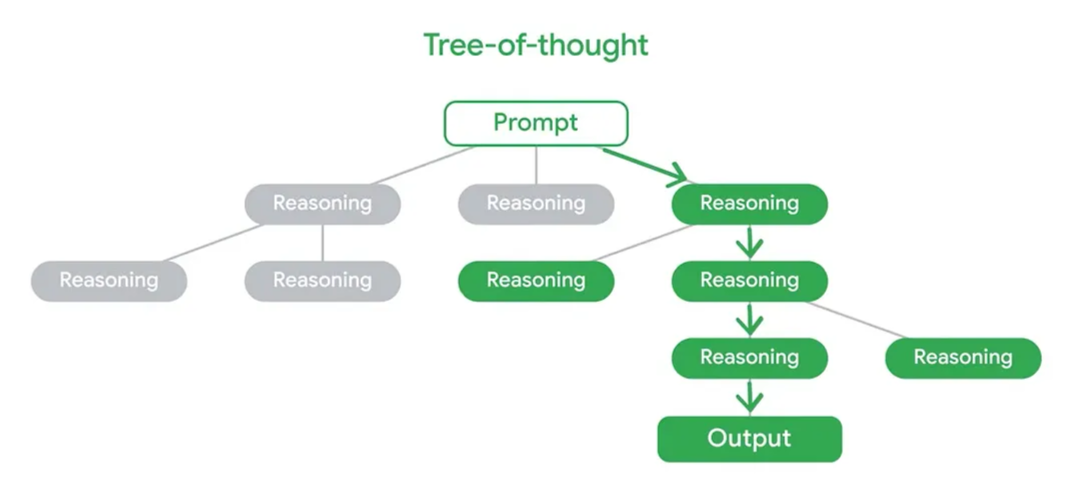
6. Tree of Thought
Tree of Thought (ToT) is an advanced technique that takes Chain-of-Thought (CoT) reasoning one step further. While CoT encourages the AI to find one logical path to an answer, ToT asks the AI to explore multiple, branching paths of reasoning before committing to the best solution. This process mirrors how humans often solve complex problems by considering multiple angles before committing to a final strategy.
ToT Prompt: “Develop a strategic marketing plan for a new language learning app called ‘Lingua-Flow.’ First, generate three distinct marketing strategies (e.g., social media focus, partnership focus, content marketing focus). Second, evaluate each strategy by analyzing its potential reach, cost-effectiveness, and time-to-impact. Finally, select the single best strategy and provide a detailed execution plan for the first 90 days.”
The Missing Cookies Mystery
Prompt: You are a detective solving a simple mystery. I need you to use a Tree of Thought (ToT) approach to find the culprit(s).
The Mystery:
Mom baked 10 cookies. There are only 6 left. Exactly 4 cookies are missing.
The Suspects:
– The Dog
– The Big Brother
– The Little Sister
The Clues:
– Clue 1: The cookie jar is on a high shelf that is too high for the dog to reach.
– Clue 2: The Big Brother has crumbs on his shirt. He claims he only ate 2 cookies.
– Clue 3: The Little Sister has chocolate on her face. She claims it’s from a chocolate bar.
Your Task (Follow these steps to build your “thought tree”):
Step 1: Initial Hypotheses.
Generate a list of three distinct “Thoughts” or hypotheses to explain where the 4 cookies went. Each thought should focus on a single suspect.
Step 2: Evaluation and Pruning.
For each of your initial hypotheses, evaluate it using the provided clues. State whether the hypothesis is valid or invalid based on the evidence. If a hypothesis is invalid, explain why and “prune” it (meaning, discard it from consideration).
Step 3: Synthesis and Final Conclusion.
Look at all the hypotheses that were NOT pruned. Can you combine them to create a single, logical explanation that accounts for all 4 missing cookies and fits all the clues? State your final conclusion clearly.
7. Prompt Chaining
While Chain of Thought guides a model to think step-by-step within a single prompt, Prompt Chaining uses a series of independent prompts where the output from one prompt becomes the input or context for the next prompt. Connecting prompts is like connecting links in a chain—which is why this process is called prompt chaining. Prompt chaining guides a generative AI tool through a series of interconnected prompts, adding new layers of context or tasks each step of the way. Eventually, those linked prompts help the tools solve complex problems one step at a time, just like putting together a puzzle.
Prompt: “Generate three options for a one sentence summary of the attached novel manuscript. The summary should be similar in voice and tone to the manuscript but more catchy and engaging.”
“Now, create a tagline that is a combination of the previous three options, with a special focus on the exciting plot twists and mystery of the book. Find the catchiest and most impactful combination. The tagline should be concise and leave the reader hooked and wanting to read.”
“Create a five sentence summary of the entire manuscript below that expands on the one sentence summary.”
“Generate a six-week promotional plan for a book tour, including what locations I should visit and what channels I should utilize to promote each stop on the tour.”
Based on the promotion plan, generate a visually energetic poster that can be shared on social media. The poster should contain the book title, tagline, author name, book tour venue & date.
The strength of Prompt Chaining is that it prevents the AI from getting overwhelmed by a single, massive request. You handle the complexity by acting as the project manager, assigning one clear task at a time and adding context with the previous results.
8. Meta Prompting
Meta Prompting is the practice of asking the AI to write or improve a prompt for you. Instead of manually struggling to craft the perfect, detailed request, you give the AI a high-level instruction (a “meta-prompt”) and let it generate the final, effective prompt.
In short, meta-prompt is a prompt that writes an effective prompt.
Examples of a Meta Prompt:
Scenario: You are a creative writing teacher and you want your students to write a short story. You need to generate a unique prompt for each student to prevent plagiarism and encourage creativity. Manually creating 30 different prompts is time-consuming and difficult.
“You are a prompt generator for a creative writing class. Your task is to create a single, specific prompt for a student to write a short story. The generated prompt must follow these rules:
* Start with a clear command: Use a phrase like ‘Write a short story about…’
* Establish a character: The main character must have a unique profession or a surprising past.
* Define the setting: The story must take place in an unusual or unexpected location.
* Introduce a specific conflict or challenge: This should be a clear problem that the character must solve.
* Specify a tone: The tone must be either ‘humorous’ or ‘melancholic’.
* The final output should be only the generated prompt itself, without any introductory text or explanation.”
Response (The Generated Prompt):
“Write a short story about an retired deep-sea salvager who has taken a job as a lighthouse keeper on a remote, landlocked mountain peak. One night, a mysterious, glowing object falls from the sky and lands just beyond his reach. The salvager must figure out what the object is and how to retrieve it, all while dealing with his own feelings of isolation and regret. The story’s tone should be melancholic.”
Meta prompting also works with images (a multimodal input). If you want a logo to match the feel of a specific painting, you can upload the painting and use this meta-prompt:
“Generate a prompt I can use to create the perfect logo for my dog food company that evokes the style of the attached image. The prompt should specify the color palette, texture, and historical era suggested by the artwork.”
9. Iterative Role Playing
Iterative Role-Playing is a powerful technique where you engage in a dynamic, back-and-forth conversation with the AI, often by switching roles between prompts.
Instead of submitting one massive prompt, you and the AI collaborate on a single project by taking on different personas (like a CEO and an Analyst, or a Student and a Teacher). This method allows you to progressively refine the output, correct flaws, and build complex documents, much like a dialogue with a human team member.
Example: Creating a Business Plan
Instead of asking for a complete business plan in one go, you can use iterative role-playing to build it section by section.
* Prompt 1 (You as CEO, AI as Business Analyst): “You are a business analyst. I am the CEO of a new tech startup. Our product is an AI-powered personal finance app. Draft an executive summary for our business plan, highlighting our mission and value proposition.”
* Prompt 2 (You as CEO, AI as Marketing Strategist): “That’s a good start. Now, switch roles. You are a marketing strategist. I need a detailed marketing plan section. Focus on social media and influencer partnerships. Provide specific campaign ideas.”
* Prompt 3 (You as Financial Director, AI as Accountant): “The marketing plan looks solid. Let’s move to the financials. You are now an accountant. I need a projected profit and loss statement for the first three years. Assume a conservative growth rate of 15% annually.”
Example: “Act as a mock interviewer, interviewing me for the position of Python programmer. Ask me a behavioral question first, and then follow up with a technical question about object-oriented programming.”
You answer the interview questions & add a follow-up prompt
“Now, switch your role to an interviewer coach. Give me feedback on my answers and suggest how I could improve my technical explanation.”
10. Image Generation
Prompting for image generation is where your imagination truly comes alive! It’s the art of talking to an AI model to transform your wildest visual ideas into digital masterpieces. Think of it as being both the director and the artist—you describe the scene, and the AI paints it for you.
The more precise and descriptive your words, the closer the generated image will match your creative vision. It’s a combination of different elements like the subject, style, mood, color palette, composition, and any other distinctive features you want to include. Experimenting with different prompt structures unlocks a vast range of artistic possibilities, making image generation accessible and engaging for everyone.
The Anatomy of an Image Prompt
Here’s how to structure your prompts to get the best visual results:
- Subject: The main star of your image.
- Example: “A majestic dragon,” “a futuristic cityscape.”
- Style Modifiers: The artistic look or medium. This is crucial for setting the aesthetic.
- Examples: “Photorealistic,” “oil painting,” “digital art,” “concept art,” “3D render,” “cinematic lighting,” “in the style of Van Gogh.”
- Prompt Example: “A pyramid made of glass, rendered in Unity and tinted red.“
- Setting/Environment: Where your subject is located.
- Examples: “In a misty forest,” “on the surface of Mars,” “a bustling city street.”
- Atmosphere and Mood: The overall feeling you want the image to convey.
- Examples: “A peaceful morning,” “a dramatic, high-energy scene,” “a melancholic mood.”
- Additional Details: Specific elements like lighting, colors, or camera angles.
- Examples: “Dramatic lighting,” “soft sunlight,” “vibrant, warm colors,” “a close-up shot,” “aerial view.”
The Golden Rule: Iterate, Iterate, Iterate!
The key to successful image prompting is an iterative process. Start simple, see what the AI generates, and then add more details, keywords, and stylistic modifiers to refine the results until you get your perfect image.
Mastering Color Palettes
Controlling the color palette in your prompts is a powerful way to set the mood and visual tone of your image, rather than leaving it to chance.
- Specific Colors and Shades: Name the colors directly.
- Examples: “A vibrant red and gold sunset,” “a calm scene with shades of blue, teal, and soft white.”
- Color Schemes: Use art terms to guide the AI.
- Examples: “A monochromatic scene” (using one color, varying shades), “a complementary color scheme” (colors opposite on the color wheel, like blue and orange), “a pastel color palette” for a soft look, “earth tones,” or “neon colors.”
- Moods and Associations: Describe the feeling you want the colors to evoke.
- Examples: “Warm colors” (reds, oranges, yellows) for cozy or energetic, “cool colors” (blues, greens, purples) for calm or mysterious.
- Quality Boosters: These enhance the resolution and detail.
- Examples: “High resolution,” “2K,” “4K,” “sharp focus.”
- Prompt Example: A beautiful, majestic, incredible pyramid, 4K.
Guiding Composition
Composition is all about how elements are arranged within your image. By including composition notes, you can direct the AI to create a more dynamic, balanced, or artful scene.
- Rule of Thirds: Imagine a grid over the image; place subjects along lines or intersections for balance.
- Examples: “Subject off-center,” “main character positioned according to the rule of thirds.”
- Camera Angles and Shot Types: Direct the AI on how to frame the subject.
- Examples: “Close-up shot,” “wide-angle view,” “aerial view,” “from a low angle,” “fisheye lens view.”
- Perspective: Control the viewer’s point of view.
- Example: “A one-point perspective of a long road.”
- Framing: Use elements within the scene to frame your subject.
- Examples: “A character framed by a doorway,” “a landscape viewed through a window.”
- Symmetry and Asymmetry: For balance (“symmetrical composition”) or dynamism (“asymmetrical composition”).
Prompt: Generate close-up images of a pair of sleek silver headphones on a desk in a college dorm room. They should have musical notes floating around the headphones to show that they’re playing music.
Pro Tip: Want to hone your image-generation prompting skills? Try playing “Say What You See,” a fun web-based game where you describe images and compare your description to the original prompt used to create them!
11. Data Analysis & Visualisation
AI as an Analyst: Most data is noise until someone asks the right questions, draws insights and creates the right visualisation. That someone, can now be the Gen AI.
Start with the right questions. AI performs best when there is an intent.
- “What decisions am I trying to make?”
Ditch the jargons. Act like human
- Technical Prompt: “Calculate the compound annual growth rate (CAGR) by territory.”
- Intent-Driven Prompt: “Which regions have shown the most steady, predictable growth in the last three years?”
- Technical Prompt: “Create a pivot table showing churn rate by month for Q2.”
- Intent-Driven Prompt: “What caused customer churn to spike after April 2025? Show the top three factors.”
See it as a story instead of stats & pivot tables
- Technical Prompt: “Plot customer growth over the last six quarters.”
- Intent-Driven Prompt: “Show me the story of our customer growth over the last six quarters using a compelling graph, and explain the trend.”
Using AI as a Strategic Thinking Partner. Explore the unasked questions
- “What’s unusual in this dataset?”
- “Are there any non-obvious trends or anomalies that deserve my attention?”
- “Based on the 2024 sales data, suggest three strategic questions I should be asking the executive team next quarter.”
By using natural language and asking intent-driven questions, you shift your role from a data cruncher to a strategic leader, amplifying your expertise with the help of AI.
Prompt Engineering is the new literacy. A powerful means for productivity, innovation, and strategic thinking. Start simple, be specific, and never stop iterating.
Ready to start amplifying your work? Go try your first structured prompt!
Please click & expand for some sample prompts you can use to practice, learn & explore
- “Explain quantum computing like I’m 10 years old. Use a simple analogy.”
- “Explain blockchain vs. traditional databases using a simple analogy.”
- “I took these notes on Python loops. Explain the core concepts back to me like I’m a beginner.”
- “I believe remote work hurts team creativity. Argue AGAINST my view.”
- “I’m writing a blog post about sustainable fashion. Give me 10 unexpected angles.”
- “Rewrite this email to be 30% shorter and more direct. Keep it polite but urgent:”
- “Rewrite this paragraph for non-experts. Remove acronyms. Use everyday words: [Paste technical text]”
- “Act as a busy, skeptical HR manager. How would you react to this new employee wellness policy? What questions would you ask?”
- “How would Marie Curie approach solving climate change today? Describe her method in 3 steps.”
- “You are a poet who works in a whimsical style. Write me a 4-line poem about a cat.”
- “Provide a concise, bullet-point list of the benefits of our new product xyz.”
- Provide a summary in bullet point format of the following scientific [PDF document]. Highlight the 3 most important findings.
- Sort these on a timeline: Voice assistants, First chess computer, Self Driving cars, Turing Machine.
- Paste a picture of a scientist and ask the AI tool to identify who this is?
- Paste a picture of a scenary and ask the AI tool to describe the image?
- “Create a Ghibli image of a rabbit in the forest.”
- “You are a social media expert for an eco-friendly brand. Generate three post ideas for posting on social media.”
- “Generate a misty landscape with rolling hills and light rain in the impressionism style.”
- “Generate an image of a cityscape that blends the geometric shapes of cubism with the vibrant colors of pop art.”
- “Create an image of a glass of water on a table by the beach. There are lots of droplets on the outside of the glass. In the background you can see the turquoise water of the ocean. It’s a beautiful summer vacation scene.”
- Provide a summary in bullet point format of the following scientific [PDF document]. Highlight the 3 most important findings.
- “Summarize the following meeting transcript and create a meeting summary that includes the following items:
Agenda: A brief description of the meeting’s objective.
Date and Time: Clearly state when the meeting took place.
Attendees: List all participants.
Summary of Discussions: Highlight the main subjects discussed.
Action Items. Please put the action items into a table format, along with who is responsible and time to complete for each action item,
Follow-Up Meetings: If applicable, mention when the next meeting is scheduled.
Additional Information Needed: Outline any further information required to move forward
Key Insights/Takeaways: Summarize the most important points or decisions that are critical for stakeholders to be aware of.
Return your final response as well formatted word document.” - “I’m trying to learn Spanish to better communicate with my clients who live in Guatemala. Take on the persona of a skilled Spanish tutor and help me learn Spanish. I want you to teach me Spanish by delivering increasingly difficult lessons, crafting educational activities and scenarios, chatting with me in Spanish, and quizzing me. Correct my errors when I respond and call out areas of improvement. Provide feedback in English only. When I want to end the lesson, I’ll write “adios.” After we finish our conversation, provide me with a personalized list of vocabulary words, conjugations, and tips I should study to become a better Spanish speaker.”
- “Act as if you are Steve Jobs in a product review meeting. I’m presenting our online community platform. Give brutally honest feedback on design, focus, user experience, and innovation. Challenge what’s missing and what could be revolutionary, Then give clear, high-level directions.”
- You’re a movie critic that specializes in Italian film. Create a table that contains the greatest Italian films of the 1970s, and separate them into genres like thrillers, dramas, and comedies. Provide a 100-word summary of each movie as well as details about the production including director and release year.
- Travel-Destination Inspiration:
- “I have a budget of $2,000 for a week-long trip in October. I want somewhere with warm weather and great hiking. Suggest three destinations within a 6-hour flight of New York.”
- “Help me brainstorm a ‘bucket list’ trip for a solo traveler who loves street photography and spicy food.”
- “We are looking for a family-friendly destination in Europe that isn’t too crowded but has plenty of activities for a 5-year-old.”
- Travel-Itinerary Building:
- “Create a 4-day itinerary for Tokyo that focuses on hidden gems and local cafes rather than the main tourist spots. I’ll be staying in the Shibuya area.”
- “I’m visiting Paris for the first time. Can you build a 3-day schedule that balances the major landmarks with relaxing time in parks?”
- “Design a 10-day road trip route through the Scottish Highlands, including the best stops for scenic views and historic castles.”
- Travel-Budgeting & Logistics:
- “What is the average daily cost (excluding accommodation) for a couple visiting Lisbon? Break it down by meals, transportation, and museum entries.”
- “Compare the pros and cons of traveling by train vs. renting a car for a tour of Tuscany.”
- “Help me create a packing list for a 2-week trip to Iceland in December. Include essential gear for glacier hiking.”
- Travel-Food & Experiences:
- “Give me a list of 5 must-try local dishes in Mexico City and suggest one specific neighborhood known for having the best street stalls for each.”
- “I love Art Deco architecture. Which neighborhoods in Miami or Havana should I prioritize for a walking tour?”
- “Are there any cultural etiquette rules I should know before visiting a traditional Onsen in Japan?”
Please click & expand for a wealth of resources & the references
- Prompt Engineering Guide
- Prompting guide 101
- OpenAI Academy
- Prompt engineering overview – Claude Docs
- Anthropic’s Interactive Prompt Engineering Tutorial
- Introduction to Generative AI and LLMs (Part 1 of 18) – Microsoft Learn
- Stanford Institute for Human-Centered Artificial Intelligence
- All Things Generative AI
- OpenRouter
- There’s An AI For That
- Fireflies.ai
- NotebookLM
- Anthropic Claude
- Gemini
- Google AI Studio
- Colab
- Claude
- Microsoft Copilot
- ChatGPT
- Midjourney
- Stability AI Image Models
- Runway
- ElevenLabs
- DALL-E
- Canva Magic Design
- Adobe Firefly
- Phot.AI
- HeyGen
- Vibe coding: Emergent
- Study Together: https://x.com/omooretweets/status/1942644108750639502
- Stock research – https://x.com/JafarNajafov/status/1939997860768199076
- Game Theory – https://x.com/PromptLLM/status/1942228380486701437
- Financial Planning: https://x.com/alex_prompter/status/1946841854164508811
- Systems Thinking: https://x.com/PromptLLM/status/1944031671285608960
- JSON Prompting https://x.com/thisguyknowsai/status/1956269176391393699
- 15 Viral ChatGPT AI Prompts That You Must Try -ChatGPT Prompts That Actually Work – Mystic | ILLUMINATION
- 50 Design Styles Every Designer Should Know for Better Prompting – Himanshu Bhardwaj – Aug, 2025 – UX Planet
- PAIR Explorables
- What is a long context window? Google DeepMind engineers explain
- Prompt Engineering – Pinterest Board
- God of Prompt – X
- PromptLLM – X
- Neat Prompts – X
- Google Labs – X
- Master the Perfect ChatGPT Prompt Formula (in just 8 minutes) – YouTube
- AI Engineering – X
- LearnPrompt.org
- The 7 Deadly Sins of Prompting
- Layers of Prompting
- https://medium.com/@jordan_gibbs/behold-the-prompt-bible-is-here-27e739eeffcd
What next?
– Practice different prompting techniques. Playing and experimenting with prompts is the best way to figure out how to get what you want & learn what works for you.
– Create and maintain a prompt library. It’s a powerful way to capture most effective prompts, make them reusable and develop your gen AI prompting skills. Ref: Template
– Try different LLM models to identify your go-to model.
– Learn about AI Agents. Difference between Generative AI & Agentic AI.
– What is context engineering?
– Share you favourite prompting technique, model and tips in the comment section below. Thank you 🙂
The future belongs not to those who fear these new tools, but to those who learn to wield them creatively—and in doing so, shape what comes next for us all.
*This blog post was refined using Gemini.

 Attitude is Everything